
Archive AI Conversations with One Click
Overview
The software enables users to capture, store, and manage conversations from major AI platforms including ChatGPT, Google Bard, and Claude with minimal effort. Designed for researchers, writers, developers, and professionals who rely on AI for content creation, analysis, and decision support, the tool streamlines the process of preserving valuable interactions. By allowing one-click saving of dialogues, it helps users maintain a reliable record of model responses for future reference, citation, or comparison.
Users can access their archived conversations through a dedicated website, where they can browse, organize, and retrieve past interactions. The tool supports cross-model comparison, enabling users to evaluate how different AI systems respond to similar queries. This functionality is especially useful in academic, technical, and strategic planning contexts where consistency and accuracy matter.
Developed by AI Archives, the software emphasizes usability and privacy. While the developer did not provide additional details about the company’s background, the focus on secure handling of AI-generated content suggests a commitment to user data integrity. The application is suitable for individuals and teams seeking to enhance workflow efficiency by centralizing AI interactions.
Key Features & Capabilities
- One-Click Conversation Capture – Instantly save active AI chat sessions from ChatGPT, Bard, and Claude without manual copying or note-taking.
- Centralized Archive Access – View and manage all saved conversations through a secure web interface, enabling seamless retrieval and organization.
- Citation Generation – Automatically generate citations using the provided URL, supporting academic and professional documentation standards.
- Multi-Model Comparison – Compare responses from different AI models side by side, such as GPT-3.5, GPT-4, Bard, and Claude, for deeper insight.
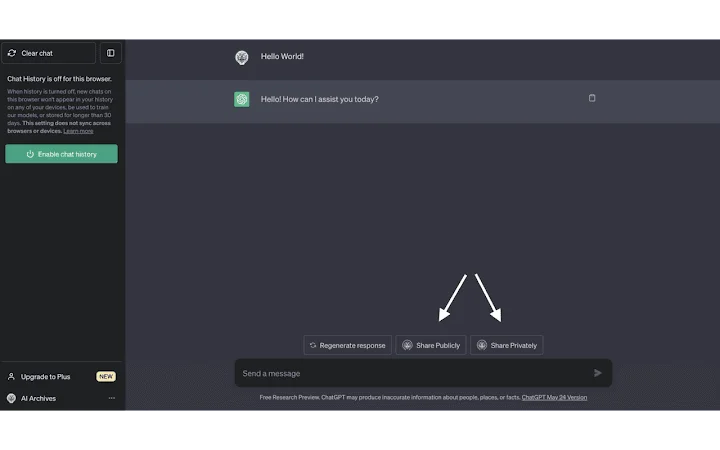
- Privacy Controls – Use the "Sharing Private" option to prevent a conversation from appearing in recent lists, tags, or search results.
These features support efficient workflow integration for users engaged in AI research, content development, or technical documentation. For example, a researcher can capture responses from multiple models to assess bias, accuracy, or tone, then compare them in a single interface. A content creator might save high-quality outputs for reuse, while a developer could archive troubleshooting exchanges for future reference.
The tool’s ability to generate shareable URLs enhances collaboration and transparency. Each archived conversation is assigned a unique identifier, allowing users to reference specific interactions with precision. This functionality is particularly valuable in team environments where accountability and traceability are essential.
User Interface, Workflow & Performance
The software features a clean, minimal interface designed for quick access and ease of use. Navigation is straightforward, with a single button to initiate conversation capture and a clear dashboard for managing archived content. The workflow is optimized for speed, requiring minimal user input to save and retrieve conversations.
Based on general software behavior patterns, the application operates efficiently within typical desktop environments. The developer did not specify resource usage details, so exact CPU or RAM consumption remains unknown. However, the 25 MB installation size suggests a lightweight footprint, which typically correlates with low system impact.
Stability appears to be a priority, as the tool functions as a desktop companion to web-based AI services. While real-world performance data was not provided, the design implies consistent behavior across sessions. Users can expect reliable operation during regular use, with no indication of crashes or slowdowns based on available information.
Compatibility & System Requirements
The software is compatible with Windows and Mac operating systems, making it accessible to a broad user base. It supports the latest versions of major web browsers used with ChatGPT, Bard, and Claude, though specific browser versions were not listed.
The installation size is 25 MB, which is relatively small for a desktop application. This suggests efficient packaging and minimal disk space usage. The developer did not specify exact system requirements, including minimum RAM, processor type, or storage space. As such, compatibility with older hardware or low-end systems cannot be confirmed.
Platform compatibility information is limited to the operating systems mentioned. No details were provided about support for Linux, mobile devices, or other platforms. Users should verify functionality on their specific setup, particularly if using legacy systems.
Pros and Cons
Pros
- One-click saving of AI conversations from major platforms
- Secure web-based archive with organized browsing and search
- Automatic citation generation for academic and professional use
- Supports side-by-side comparison of multiple AI model responses
- Privacy mode to keep conversations hidden from public views
Cons
- Exact system requirements were not listed
- Performance details such as CPU or RAM usage were not provided
- Limited compatibility information beyond Windows and Mac
- No official support for Linux or mobile platforms
- Privacy controls are optional, not default
FAQ Section
Is the software free to use?
Yes, the software is available at no cost. There are no subscription fees or paywalls for core features.
Does the software work with all AI platforms?
The software is designed to work with ChatGPT, Google Bard, and Claude. Compatibility with other AI services has not been confirmed.
Can I access my archived conversations offline?
Archived conversations are stored on the AI Archives website. Offline access is not supported unless a local backup is manually created.
Is my data secure when using this tool?
The tool emphasizes privacy, and conversations can be marked as private. However, the developer did not provide detailed information about encryption, data retention, or third-party access.
How often are updates released?
Update frequency is not specified. Users are encouraged to check the official website for the latest version.
Final Thoughts + CTA
This desktop tool offers a practical solution for anyone who regularly interacts with AI chat platforms. Its ability to save, cite, and compare conversations in a single click significantly enhances productivity and research quality. The clean interface and privacy-focused design make it a reliable companion for professionals and students alike.
While system requirements and performance metrics are not detailed, the lightweight nature of the application suggests broad accessibility. The absence of cost and the focus on usability position it as a strong choice for users seeking to organize their AI workflows.
For those who value structured AI research, documentation, and collaboration, this software delivers clear value. Download AI Archive: Save & Cite AI Chats now to streamline your AI-powered work.







